ROSbot ROS 2 driver v1.0.0 released!

You leave your ROSbot on the desk, walk away to grab a coffee, and when you turn around you hear a faint whirr. The wheels are spinning, the robot is inching toward the edge of the table, and you catch it half a second before gravity does. Once your heart rate settles, one question stays stuck in your head: who just sent it /cmd_vel?
If you have ever shared a lab network with more than one ROSbot, you already know the answer: two robots listening on the same /cmd_vel, no namespaces to keep them apart, and whoever boots last wins. We have heard that story from users often enough, and lived it ourselves a few times, that fixing it became one of the headline goals for this release.
Today we are shipping ROSbot ROS v1.0.0, the first stable, unified release of the ROSbot software stack, covering both ROSbot 3 and ROSbot XL. Highlights:
- Full ROS 2 namespace support across the driver and the firmware.
- Zenoh networking for fleets that need to scale beyond one robot on one Wi-Fi.
- Shared ROS 2 config across your accessories: set the namespace, middleware, and domain once on the ROSbot, and it cascades to every chained Husarion snap.
- Up to 10× higher sensor and control loop rates thanks to a firmware-wide scheduling rewrite.
- A
led_striptopic (ROSbot XL) that lets you drive the LED panel from your own ROS 2 node. - Cartesian gamepad control of the manipulator (ROSbot XL): command motion in the gripper's own frame instead of joint by joint.
- One firmware repository for both ROSbot 3 and ROSbot XL.
- A simpler project structure that makes it easier to plug in your own changes.
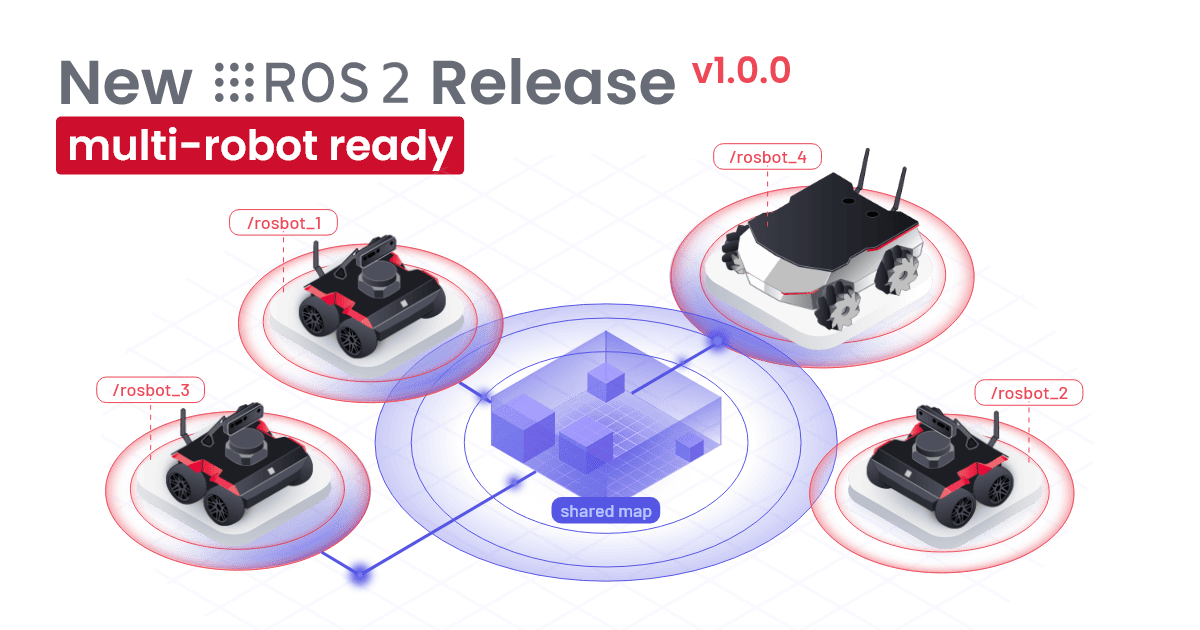
Namespaces, finally
The desk story above is funny only after the fact. The fix is boring and overdue: ROS 2 namespaces, applied consistently across the entire stack, in both the rosbot_ros driver running on the on-board computer and the rosbot-firmware running on the STM32.
In v1.0.0 you set a namespace once and the whole robot follows. Topics like /cmd_vel, /odom, /imu/data, /battery, and /led_strip are all republished under your chosen prefix on both sides of the link to the microcontroller. Run two ROSbots on the same network as rosbot_a and rosbot_b, and they stop fighting over /cmd_vel.
If you only ever run one robot on your network, you can ignore this section. If you have a fleet, or share a lab with someone who does, this is the change you have been waiting for.
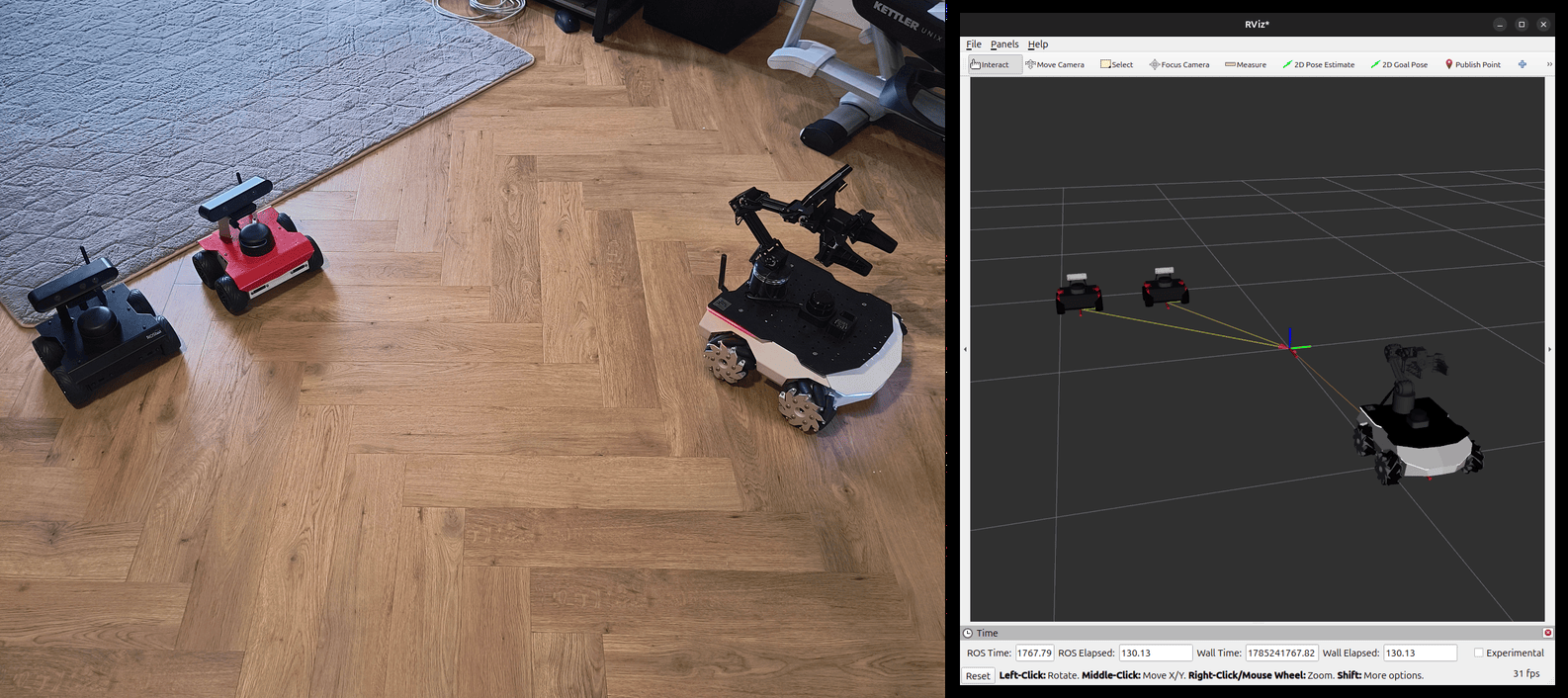
TF frames in a single RViz
Frames from each robot are automatically merged into a single namespaced view, so one RViz window can show your whole fleet. The merging is done by tf_namespace_bridge, which ships enabled by default; if you don't need the merged view, turn the bridge off and save the CPU.
Zenoh: a leaner network for the fleet
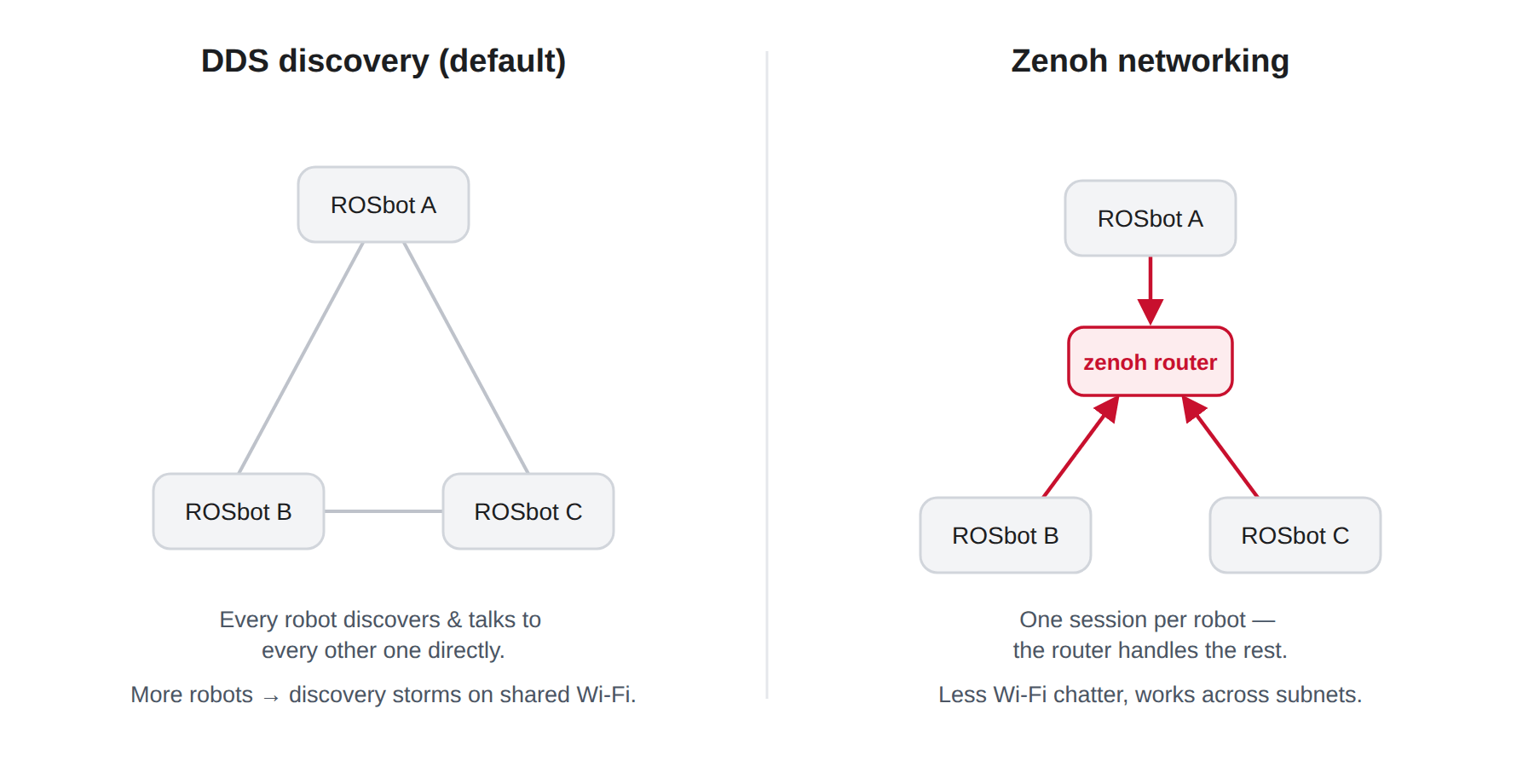
Namespaces keep robots from stepping on each other's topics. Zenoh takes care of the network they share. v1.0.0 adds Zenoh support to both ROSbot 3 and ROSbot XL through rmw_zenoh, the alternative ROS 2 middleware that became available with Jazzy. ROSbot now supports three RMW implementations out of the box: Fast DDS, CycloneDDS, and Zenoh.
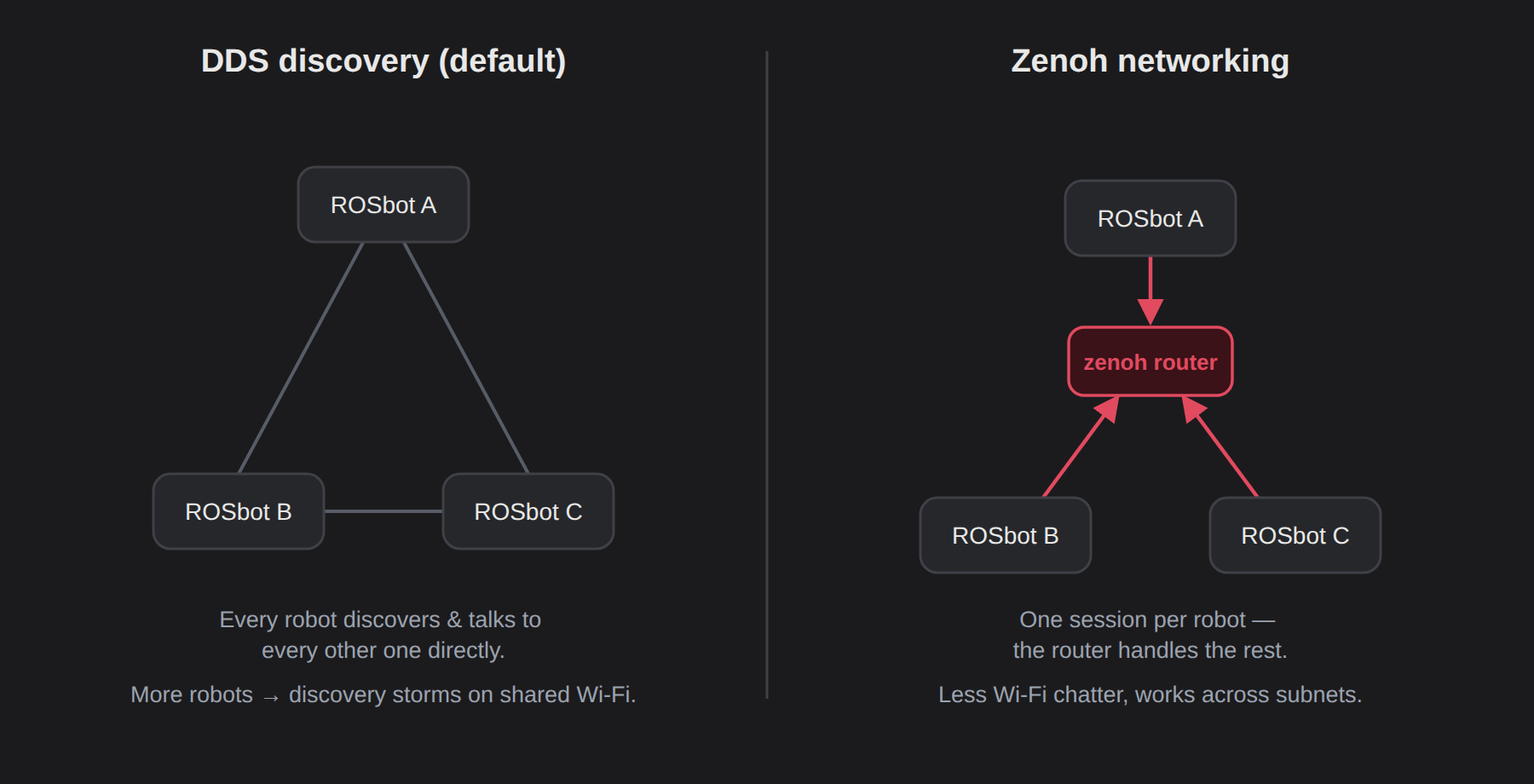
This is not about DDS being bad. DDS is a proven standard, it runs most ROS 2 robots in the field, and it stays the default on ROSbot. What hurts on multi-robot Wi-Fi is the default discovery mechanism: peers find each other by announcing themselves over UDP multicast, which access points handle poorly, so with several robots on one network discovery gets slow and the air fills with background traffic. You can tune DDS around this (eProsima's Fast DDS Discovery Server exists for exactly this case), or you can switch to Zenoh, which routes discovery through a lightweight router process and behaves well on wireless networks without tuning.
- Add a fourth ROSbot to the network and it shows up on its own, with no per-robot tuning or static peer lists.
- Zenoh puts less background traffic on the air, which means more reliable links, especially in busy labs.
- The same setup scales beyond the lab. Robots and operator stations connect outward to a Zenoh router, so remote teleop needs only a router every machine can reach: host one on a public server, or connect your devices with Husarnet and reach the robot's router directly.
DDS stays the default for new users. Switching to Zenoh is a one-line change whenever your fleet is ready for it.
One config for your whole ROSbot, accessories included
Namespaces and Zenoh sort out how robots talk to each other. The sensors bolted onto a single robot used to be a separate chore. If you've added a Husarion LiDAR or depth camera to your ROSbot, you know the old routine: set the namespace and RMW transport on the ROSbot, then repeat the exact same settings on each accessory snap, one by one. Miss one, and you get a sensor quietly publishing on the wrong domain, the kind of bug that takes an afternoon to notice.
v1.0.0 ends that routine. Install a husarion-rplidar or husarion-depthai snap alongside rosbot and they connect themselves automatically, with no pairing step. From that point on, the ROSbot snap owns the config for the whole chain: set the ROS 2 environment (namespace, middleware, domain ID) once, and it cascades to everything attached to it.
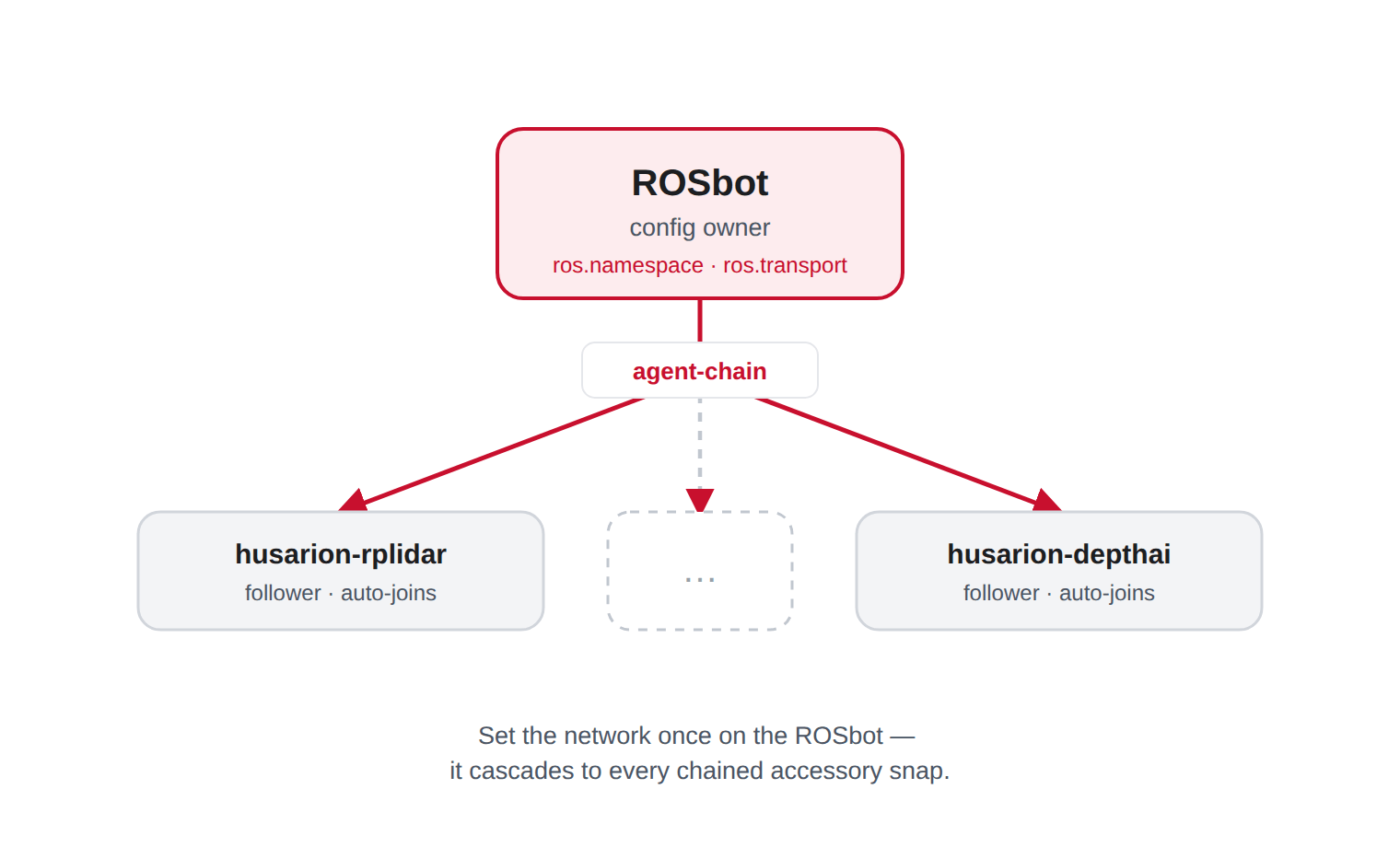
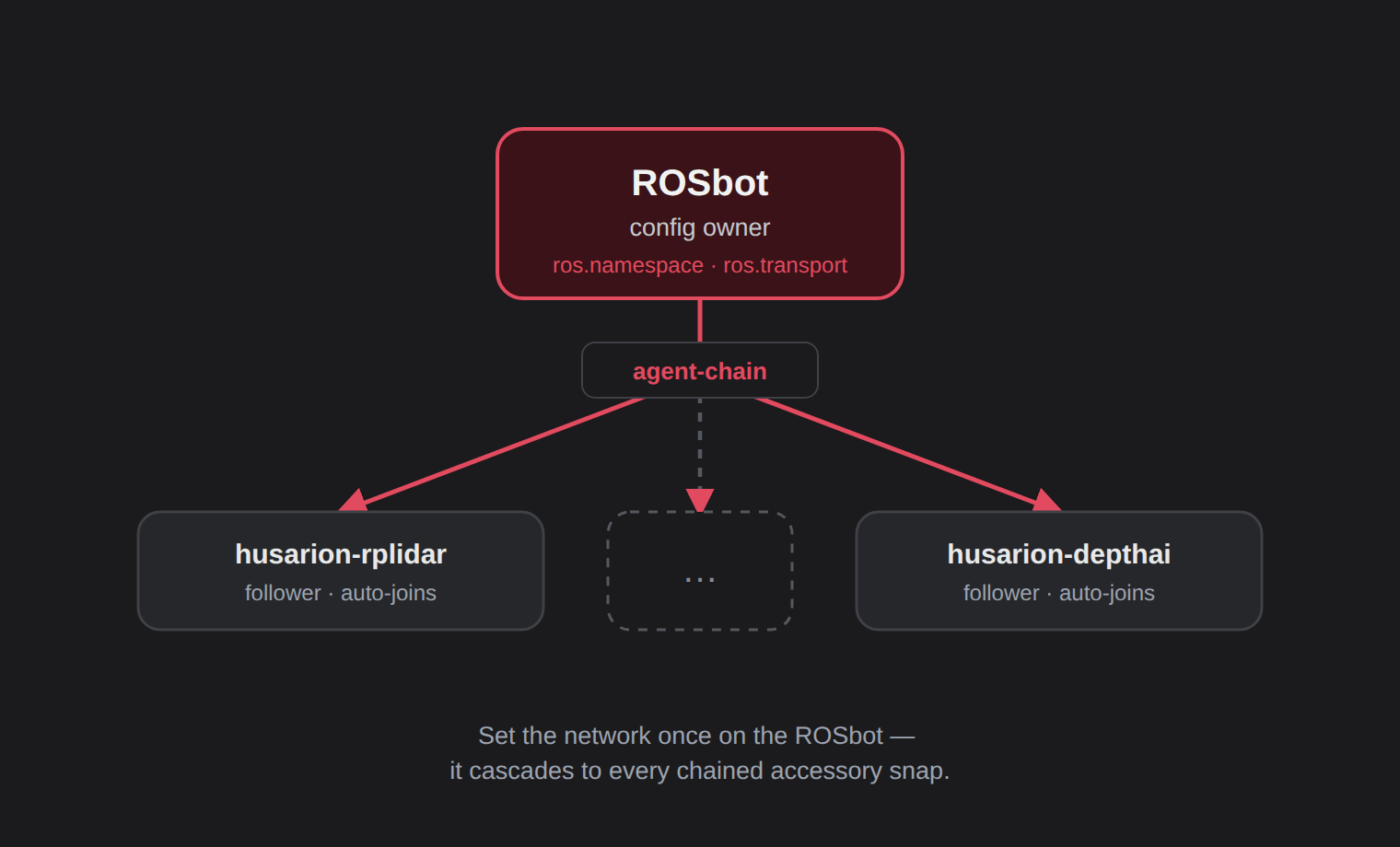
sudo snap set rosbot ros.namespace=rosbot ros.transport=zenoh/default
Run that on the ROSbot, and every chained accessory picks up the same namespace and transport within a moment. There is nothing to repeat on the accessories themselves, so there is also nothing to forget.
In practice this means a whole robot is configured in one place. Add a LiDAR and a camera and they inherit the robot's ROS 2 settings, so the "wait, is the camera still on the old domain ID?" moment goes away. Snaps installed together from the Husarion Snapcraft profile find and join each other on their own; only sideloaded installs need a one-time manual connect (right now only rosbot, husarion-rplidar, and husarion-depthai snaps auto-chain).
If you're running a Husarion Cockpit install, the same idea applies one level up: the ROS 2 settings you set from the WebUI's Manage tab cascade across your fleet of ROSbots and down to every accessory chained to each one.
A faster, more responsive robot
On the previous firmware, communication with the on-board computer was hogging the entire microcontroller: sensors and the control loop had to wait their turn, and the MCU had effectively no free time. We rewrote how the firmware divides its time between jobs, and the numbers moved a lot:
The IMU now publishes nearly 10× more often, wheel odometry and battery readings 5× more often, and the PID loop (the one you feel when the robot drives) runs twice as fast.
Fresher data means less drift and more reliable localization for SLAM, EKF, and the navigation stack. The 200 Hz PID loop translates into smoother /cmd_vel response, especially at low speeds where the old 100 Hz loop felt twitchy. And there is finally room for your own code: idle headroom went from under 1% to about 85% on ROSbot 3 and 74% on ROSbot XL, which is enough margin to drop your own task into the firmware without worrying about the MCU.
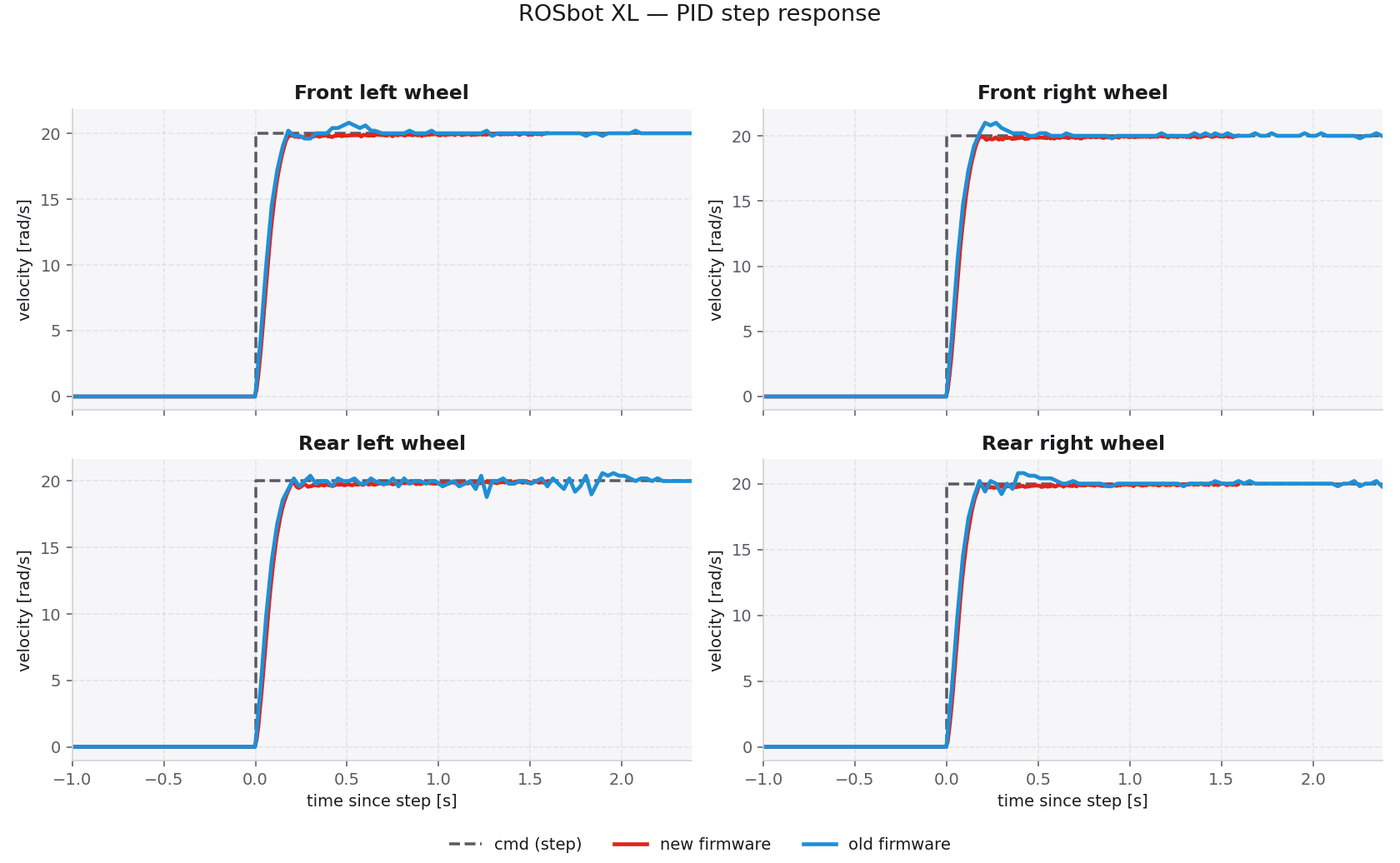
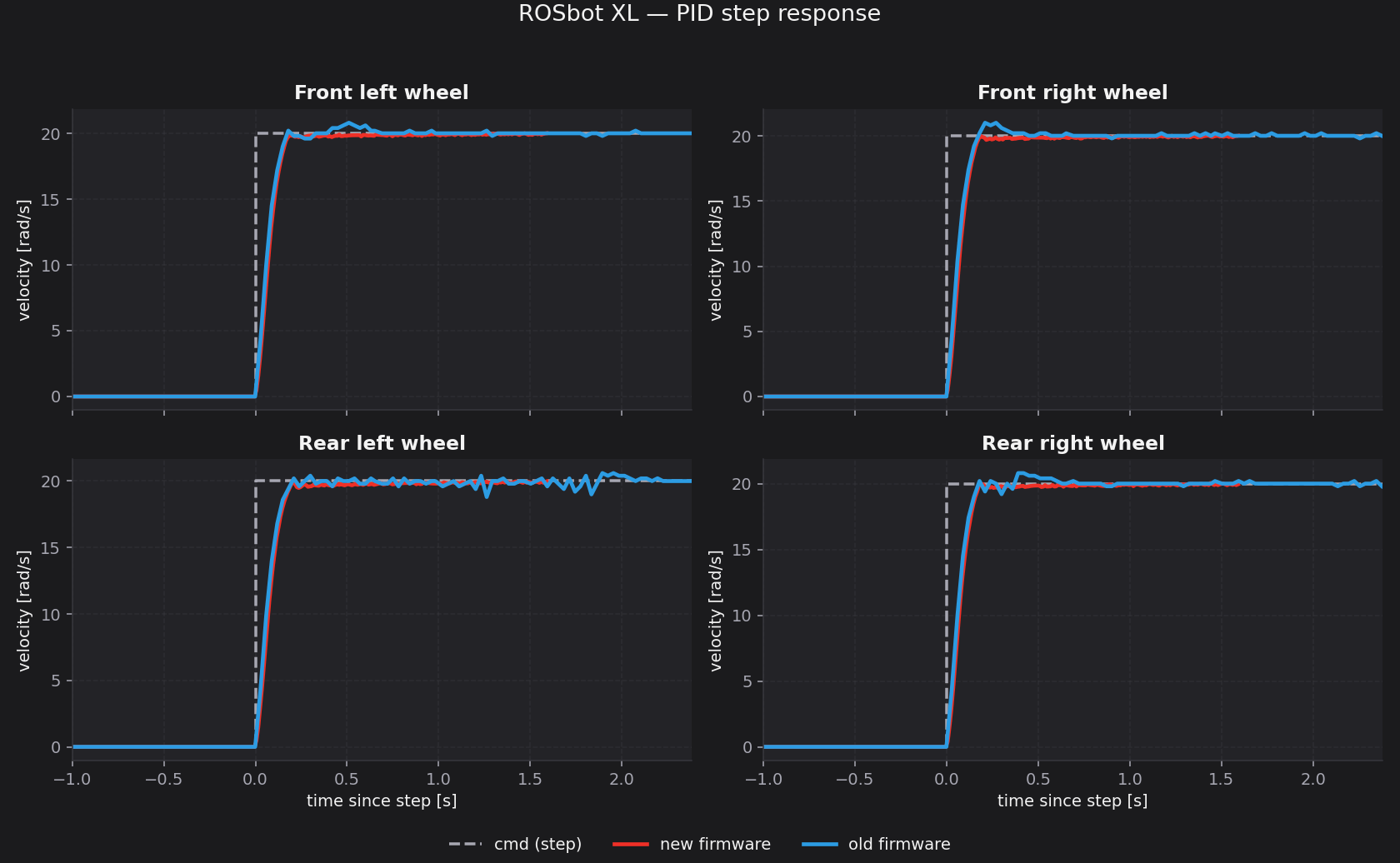
You can see the effect on ROSbot XL in the step response above. The wheels reach the target speed just as quickly as before, but without the small surges and jitter of the previous release, and they hold that speed steadily once they get there. In practice that shows up as more precise navigation and less vibration in tasks that demand accuracy.
The on-board computer and the STM32 exchange data over a MAVLink bridge, which is what ships enabled by default. micro-ROS, the older transport, is still available for setups that depend on it, but MAVLink is the path we build and test against, and everything described here works the same way on top of it.
Curious about the numbers? Open for the before/after rates and the full task breakdown
Topic and loop frequencies before and after the rebalance:
| Topic / loop | Before | After |
|---|---|---|
| Battery | 2 Hz | 10 Hz |
| IMU | 10 Hz | 95 Hz |
| PID control loop | 100 Hz | 200 Hz |
| Wheel odometry | 20 Hz | 100 Hz |
CPU breakdown by FreeRTOS task after the rebalance:
| Task | ROSbot 3 | ROSbot XL |
|---|---|---|
| IDLE | 85% | 74% |
| Communication | 6% | 7% |
| Imu | 5% | 5% |
| MotorControl | ~3% | ~3% |
| Other tasks | <5% | <12% |
The drop in communication load comes mostly from DMA-driven transfers and proper RTOS task handling. Even with roughly 10× more data flowing through it, the link to the on-board computer uses a fraction of the cycles it used to, and the idle time is free for your own tasks.
One repo, two robots: where this firmware now lives
Until now, ROSbot 3 and ROSbot XL each had their own firmware codebase, even though they share most of the components that matter: the IMU stack, the transport to the on-board computer, battery monitoring, the wheel feedback path. Every fix had to be ported twice, and inevitably one side drifted.
With v1.0.0 both robots are built from a single shared repository: husarion/rosbot-firmware. The common functionality lives in shared libraries, and from them the build produces two closely related firmware images, one for ROSbot 3 and one for ROSbot XL, so a bug fix or a new feature lands on both robots at once. The same is true on the ROS 2 side: husarion/rosbot_ros is now the single driver repository for both platforms.
The cleanup also made the project layout much easier to navigate. The whole configuration of a robot lives in include/<robot_model>/config.hpp, and the executable code that actually runs on it sits in src/<robot_model>/. If you want to swap in a different motor controller, expose a new GPIO, or add a sensor on a free I2C bus, you no longer have to hunt: the entry points are obvious and the platform-specific code is exactly where you expect it.
A led_strip topic for your own animations (ROSbot XL)
ROSbot XL ships with a side LED strip, and in v1.0.0 you can finally drive it from your own ROS 2 node. Publish a sensor_msgs/Image to /led_strip and the firmware will render it on the panel, pixel for pixel. That gives you the full color buffer to play with: status indicators, progress bars, debug overlays, mood lighting for your demo video. Whatever you can render into an image, you can render onto the strip.
Two animations ship by default and run without any user code:
- Disconnected, shown when the firmware has not yet connected to the on-board computer, so you can tell at a glance whether the robot is actually listening to ROS 2.
- Connected, shown once the link comes up.
If you want anything beyond those two states, you write the publisher yourself. We like that split: the firmware stays simple, and what ends up on the strip is entirely up to your code.
Disable the default publisher first, so it doesn't fight with yours over the strip:
sudo snap set rosbot driver.led-strip=False
Cartesian control of the manipulator (ROSbot XL Manipulation)
The OpenMANIPULATOR-X on ROSbot XL is now controllable in Cartesian end-effector space directly from the gamepad. Stick deflections translate into linear motion in the gripper's own frame; the driver runs inverse kinematics in-process and dispatches the resulting joint commands.
Working in task space rather than joint space is a more direct path from intent to motion, especially when positioning the gripper above a target, and it means operators can drive the arm without first learning the kinematic chain of the 4-DoF manipulator. Joint-space mode remains available for configurations that are out of Cartesian reach or close to a singularity.
Axis mapping, dead-man behaviour, and the tunable velocity limits are documented in MANIPULATOR.md in the rosbot_ros repository.
How to upgrade
The safest way to move to v1.0.0 is a clean reinstall of the snap: remove the old revision and install fresh from the jazzy channel.
sudo snap remove rosbot
sudo snap install rosbot --channel jazzy

sudo /var/snap/rosbot/common/post_install.sh
sudo snap set rosbot driver.model=rosbot-xl   # or 'rosbot' for non-XL models
sudo rosbot.start
If you use the accessory snaps, give them the same treatment:
sudo snap remove husarion-depthai husarion-rplidar
sudo snap install husarion-depthai
sudo snap install husarion-rplidar
That's the recommended path forward; everything in this post is tested and supported on that channel.
Summary
ROSbot ROS v1.0.0 is the first release where ROSbot 3 and ROSbot XL share a single software stack, and the first where running multiple ROSbots on the same network just works.
- Namespaces everywhere: driver and firmware both honor ROS 2 namespaces, end to end.
- Zenoh-ready networking: a leaner, fleet-friendly alternative to the default DDS, one switch away when you need it.
- Shared config across accessories: set the ROS 2 environment once on the ROSbot and every chained Husarion snap (LiDAR, camera, …) inherits it automatically.
- 10× IMU, 5× odometry, 5× battery, 2× PID: the firmware rewrite made the robot much more responsive, with idle headroom left for your own tasks.
- Programmable
led_stripon ROSbot XL: drive the panel directly from a ROS 2 node withsensor_msgs/Image. - Cartesian arm control on ROSbot XL: the OpenMANIPULATOR-X is now driven in end-effector space directly from the gamepad.
- Unified firmware: one repo builds both robots, so every fix lands on both.
- Cleaner structure: easier to read, and easier to make your own.
Namespaces and Zenoh are the plumbing. The fun starts when you point more than one ROSbot at the same task and let them split the work. In the next post we'll take the same three robots you saw above out of the RViz screenshot and into a real coordination scenario: a shared map, shared goals, and some "who goes where" logic running on top of the v1.0.0 stack.
If you have any comments or questions, you can reach us at our Community Portal, by e-mail at support@husarion.com, or through GitHub issues on rosbot_ros.