ROSbot XL - ROS 2 API
Detailed information about content of rosbot package for ROS2.
Control
Gamepad
After running the ROSbot XL Manipulation Package, you should be able to control the manipulator. The easiest way to move the manipulator is to connect a gamepad and steer the robot. The graphic below shows how to steer the manipulator using a gamepad.
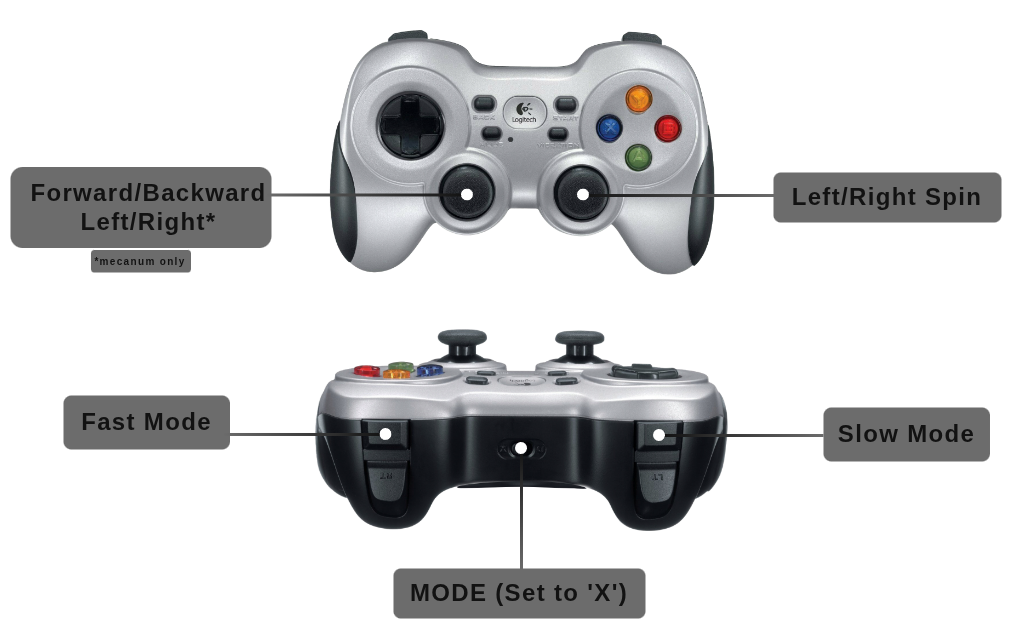
Drive controls are defined in rosbot_joy/config/config.yaml and published to manual/cmd_vel, the highest-priority input of velocity command arbitration — a held gamepad always overrides navigation. The manipulator gamepad mappings (XL only) are hardcoded in rosbot_moveit/src/joy2servo.cpp.
ROS API
Namespace policy
Set the namespace launch arg (or the ROBOT_NAMESPACE env variable) and
every topic below moves under /<namespace>/ — that is how you run several
robots on one network without them talking over each other.
A few topics stay global on purpose:
/tf,/tf_static— bridged via tf_namespace_bridge./parameter_events,/rosout— ROS 2 infrastructure./clock— simulation only./asset_providers— so one router can find every robot on a single topic.
This is hard-coded; there is no runtime switch. Details in Namespacing and multirobot.
Velocity command arbitration
Several things may try to drive the robot at once — you with a gamepad, a
navigation stack, your own script. twist_mux_controller decides who wins:
the highest-priority source that sent a command in the last 0.2 s.
| Input | Topic | Priority | Who usually publishes it |
|---|---|---|---|
manual | manual/cmd_vel | 100 | gamepad (rosbot_joy), keyboard teleop |
autonomous | autonomous/cmd_vel | 10 | nav2 |
unknown | cmd_vel | 1 | anything else |
So grabbing the gamepad overrides navigation, and letting go hands control
back automatically — no button, no mode switch. Plain cmd_vel still works,
it is just the lowest priority now.
twist_mux_controller/source tells you who is driving. On ROSbot XL the LED
strip follows it: autonomous plays the navigation animation, everything
else plays ready (turn this off with follow_cmd_vel_source: false in
rosbot_utils/config/<robot_model>/config.yaml).
Priorities and the 0.2 s timeout live in
rosbot_controller/config/<model>/controllers.yaml.
Available Nodes
| 🤖 | 🖥️ | NODE | DESCRIPTION |
|---|---|---|---|
| ✅ | ❌ | battery_alert | ROSbot XL only. Watches battery and plays low_battery.wav on the on-board speaker when the charge drops below percentage_threshold, at most once per interval_sec (the cooldown does not reset when the charge jitters back above the threshold; 0% / NaN samples are ignored as firmware glitches). The ALSA playback device is auto-detected from /proc/asound (the USB sound card the speaker PCB sits behind); set audio_device to pin it. Toggle with the battery_alert launch arg. rosbot_utils/battery_alert |
| ✅ | ✅ | controller_manager | Controller Manager performs two main functions. First, it manages controllers and their required interfaces, handling tasks like loading, activating, deactivating, and unloading. Second, it interacts with hardware components, ensuring access to their interfaces. controller_manager/controller_manager |
| ✅ | ✅ | manipulator_controller_manager | ROSbot XL manipulation* only. Second controller_manager that owns OpenManipulatorXSystem, manipulator_controller, gripper_controller and manipulator_joint_state_broadcaster (publishes the arm joints on joint_states next to joint_state_broadcaster). Split from controller_manager so a missing arm cannot take the drive down. Hardware: started and restarted by manipulator_supervisor; simulation: a second gz_ros2_control plugin. controller_manager/controller_manager |
| ✅ | ✅ | differential_drive_controller / mecanum_drive_controller | The controller managing a mobile robot with a differential or omni drive (mecanum wheels). Converts speed commands for the robot body to wheel commands for the base. It also calculates odometry based on hardware feedback and shares it.DiffDriveController or MecanumDriveController diff_drive_controller/diff_drive_controller |
| ✅ | ✅ | ekf_node | Used to fuse wheel odometry and IMU data. Parameters are defined in rosbot_localization/config/config.yaml robot_localization/ekf_node |
| ❌ | ✅ | /gz_bridge | Transmits Gazebo simulation data to the ROS layer ros_gz_bridge/parameter_bridge |
| ❌ | ✅ | gz_ros_control | Responsible for integrating the ros2_control controller architecture with the Gazebo simulator. gz_ros2_control/gz_ros2_control |
| ✅ | ❌ | husarion_asset_server | Serves this robot's package:// meshes/URDF resources over a get_asset service; auto-derives owned packages from the co-located robot_description. Toggle with the asset_server launch arg. husarion_asset_server/asset_server |
| ✅ | ✅ | imu_broadcaster | The broadcaster to publish readings of IMU sensors imu_sensor_broadcaster/imu_sensor_broadcaster |
| ✅ | ❌ | imu_sensor_node | The node responsible for subscriptions to IMU data from the hardware rosbot_hardware_interfaces/rosbot_imu_sensor |
| ✅ | ✅ | joint_state_broadcaster | The broadcaster reads all state interfaces and reports them on specific topics joint_state_broadcaster/joint_state_broadcaster |
| ✅ | ✅ | manipulator_supervisor | ROSbot XL manipulation* only. On hardware pings the arm (Dynamixel ID 11 on manipulator_serial_port); starts manipulator_controller_manager and spawns the arm controllers once it answers, logs an error and keeps retrying every 5 s while it does not, and restarts the arm stack when its controller_manager exits or OpenManipulatorXSystem leaves active/inactive (arm unplugged). Publishes the arm-only description on manipulator_controller_manager/robot_description and restarts the arm controller_manager when its hardware does not initialize within hardware_init_timeout (30 s). In simulation it only publishes the description and spawns the arm controllers. rosbot_controller/manipulator_supervisor |
| ✅ | ✅ | robot_state_publisher | Uses the URDF specified by the parameter robot*description and the joint positions from the topic joint*states to calculate the forward kinematics of the robot and publish the results using tf robot_state_publisher/robot_state_publisher |
| ✅ | ❌ | rosbot_system_node | The node communicating with the hardware responsible for receiving and sending data related to engine control rosbot_hardware_interfaces/rosbot_system |
| ❌ | ✅ | rosbot_gz_bridge | Transmits data about the robot between the Gazebo simulator and ROS. ros_gz_bridge/parameter_bridge |
| ✅ | ❌ | rosbot_mcu | Microcontroller unit (MCU) communication node: rosbot_mavlink_bridge, translating the MCU's MAVLink link to ROS 2. [rosbot_mavlink_bridge/rosbot_mavlink_bridge] |
| ✅ | ✅ | twist_mux_controller | Chainable controller arbitrating velocity commands from several sources by priority and forwarding the winner straight into the drive controller's reference interfaces — the arbitration runs inside the 100 Hz control loop, not over topics. See Velocity command arbitration. [twist_mux_controller/TwistMuxController] |
Available Topics
| 🤖 | 🖥️ | TOPIC | DESCRIPTION |
|---|---|---|---|
| ✅ | ✅ | autonomous/cmd_vel | Velocity commands from an autonomy stack (nav2). Priority 10 — yields to manual/cmd_vel. geometry_msgs/TwistStamped |
| ✅ | ✅ | cmd_vel | Velocity commands from an unclassified source. Priority 1 — the lowest, kept for backwards compatibility. geometry_msgs/TwistStamped |
| ✅ | ✅ | diagnostics | Contains diagnostic information about the robot's systems. diagnostic_msgs/DiagnosticArray |
| ✅ | ✅ | dynamic_joint_states | Publishes information about the dynamic state of joints. control_msgs/DynamicJointState |
| ✅ | ✅ | imu/data | Broadcasts IMU (Inertial Measurement Unit) data. sensor_msgs/Imu |
| ✅ | ✅ | joint_states | Publishes information about the state of robot joints. On hardware the effort field carries wheel motor torque (measured on ROSbot XL rev 1.1, back-EMF estimate otherwise); in simulation effort is NaN. sensor_msgs/JointState |
| ✅ | ✅ | joy | Publishes joystick input data. sensor_msgs/Joy |
| ✅ | ✅ | manual/cmd_vel | Velocity commands from a human operator (gamepad, keyboard teleop). Priority 100 — the highest, so it overrides autonomy. geometry_msgs/TwistStamped |
| ✅ | ✅ | odometry/filtered | Publishes filtered odometry data. nav_msgs/Odometry |
| ✅ | ✅ | odometry/wheels | Provides odometry data from the base controller of the ROSbot XL. nav_msgs/Odometry |
| ✅ | ✅ | robot_description | Publishes the robot's description. std_msgs/String |
| ✅ | ✅ | scan | Publishes raw laser scan data. sensor_msgs/LaserScan |
| ✅ | ✅ | set_pose | Changes the robot's odometry/filtered pose. geometry_msgs/PoseWithCovarianceStamped |
| ✅ | ✅ | tf | Publishes transformations between coordinate frames over time. tf2_msgs/TFMessage |
| ✅ | ✅ | tf_static | Publishes static transformations between coordinate frames. tf2_msgs/TFMessage |
| ✅ | ✅ | twist_mux_controller/source | Name of the input currently driving the robot: manual, autonomous, unknown or not_published. Latched (transient_local), republished only on handover. On ROSbot XL animation_publisher follows it, so the LED strip shows who is driving. std_msgs/String |
There are also additional topics related with the ROSbot firmware. For more information about them, please refer to the ROSbot Firmware documentation.
Available Services
| 🤖 | 🖥️ | SERVICE | DESCRIPTION |
|---|---|---|---|
| ✅ | ❌ | husarion_asset_server/get_asset | Resolves a package://PKG/REL URI to bytes (ranged fetch) for the description packages husarion_asset_server owns. husarion_asset_msgs/srv/GetAsset |
| ✅ | ❌ | led_strip/enable | ROSbot XL only. Enables (data: true) or disables (data: false) the LED strip animation. While disabled the animation_publisher node neither computes nor publishes the led_strip image, and the firmware idle animation shows instead. The current_animation parameter is remembered across the gate, so enabling resumes whatever was selected. std_srvs/SetBool |
Packages
One-line purpose per package; full detail (launch flows, internals) in ARCHITECTURE.md.
| Package | Description |
|---|---|
rosbot | Meta-package — pins sibling repos via *.repos, no code. |
rosbot_bringup | Hardware entry point: per-model bringup + MCU MAVLink bridge. Local-only. |
rosbot_controller | ros2_control setup — spawns drive, IMU and joint-state controllers (plus the manipulator on XL). |
rosbot_description | URDF/xacro for hardware and simulation, robot configurations, robot_state_publisher. |
rosbot_gazebo | Gazebo simulation launch and robot spawning. Local-only. |
rosbot_hardware_interfaces | C++ ros2_control plugins (RosbotSystem, RosbotImuSensor) — the firmware ABI. |
rosbot_joy | Joystick teleop for driving (joy_node + teleop_twist_joy). |
rosbot_localization | EKF fusing wheel odometry + IMU → odometry/filtered. |
rosbot_moveit | MoveIt manipulation for the OpenMANIPULATOR-X (XL only) — see MANIPULATOR.md. |
rosbot_utils | Utilities: firmware flashing, robot configuration, udev rules, battery alert, LED strip. |
MCU firmware API
The MCU's ROS 2 interface, advertised on the SBC by
rosbot_mavlink_bridge, which translates the firmware's MAVLink link.
Downstream nodes (e.g. rosbot_ros) consume this node name, topic list,
types, namespacing and QoS; see ARCHITECTURE.md for the
wire side.
Nodes
| NODE | DESCRIPTION |
|---|---|
rosbot_mcu | Node exposing the ROSbot MCU's topics and services. Advertised by rosbot_mavlink_bridge. |
Topics
| Rb | Rb XL | TOPIC | DESCRIPTION |
|---|---|---|---|
| ✅ | ✅ | battery | Battery status. sensor_msgs/BatteryState |
| ✅ | ✅ | buttons | Button states. std_msgs/UInt8 |
| ❌ | ✅ | led_strip | LED strip command. sensor_msgs/Image |
| ✅ | ✅ | leds | Rear panel LEDs command. std_msgs/UInt8 |
| ✅ | ❌ | ranges | Range sensor data. sensor_msgs/Range |
| ✅ | ✅ | _imu/data | Raw IMU data. sensor_msgs/Imu |
| ✅ | ✅ | _imu/calibration | BNO055 calibration status, 5 Hz — see below. std_msgs/UInt8MultiArray |
| ✅ | ✅ | _motors/cmd | Wheel speed commands. std_msgs/Float32MultiArray |
| ✅ | ✅ | _motors/feedback | Wheel feedback. sensor_msgs/JointState |
Services
| SERVICE | DESCRIPTION |
|---|---|
_mcu_id | Get MCU ID. std_srvs/Trigger |
_imu/start_calibration | Start a calibration session (red LED fast blink, 180 s). std_srvs/Trigger |
_imu/stop_calibration | End the session early. std_srvs/Trigger |
_imu/save_calibration | Persist the chip's current offsets to flash. std_srvs/Trigger |
IMU calibration
The BNO055 calibrates itself continuously; these entry points only show its progress and persist the result, so the robot keeps driving throughout and no MCU reset is needed.
_imu/calibration data layout:
[sys, gyro, accel, mag, save_state, save_seq, has_saved, session].
sys/gyro/accel/mag— the chip's CALIB_STAT, 0..3 each.save_state— result of the last save: 0 none, 1 saving, 2 saved, 3 rejected (not calibrated), 4 failed (flash).save_seq— increments on every completed save attempt.has_saved— 1 when flash holds a calibration record.session— 1 while a session started by_imu/start_calibrationis on.
Saving requires gyro == accel == mag == 3. sys is ignored: it is the
fusion's confidence, not an offset status, and it does not reliably reach 3
on an assembled robot. The session only drives the LED; a save is accepted
with or without one.
_imu/save_calibration replies success plus a JSON message:
{"result": R, "sys": .., "gyro": .., "accel": .., "mag": ..} with R one
of saved, not_calibrated, failed, timeout, no_ack, no_status.
Start/stop reply {"result": "ok" | "rejected" | "no_ack"}.